If you’re planning to visit the holy temples of Badrinath, Kedarnath, Gangotri, Yamunotri, or Hemkund Sahib in Uttarakhand, you must complete your Chardham Yatra registration first.
Don’t worry — the process is super simple! The Uttarakhand government offers both online and offline options for registration, so every pilgrim can do it easily.
To make your journey smoother, Epic Yatra helps you with the complete registration process and travel arrangements. Here’s a simple, step-by-step guide to help you complete your Char Dham and Hemkund Sahib online registration without any stress.
Chardham Yatra Registration 2026 is Now Open?
Starting March 20, the
Char Dham Yatra registration for 2026 is now open for everyone! You can register online or offline and even use the Uttarakhand Tourism mobile app for quick access.
The government may also start a token system for regular darshans, while online registration will be needed for special pujas like Rudrabhishek.
Update: Offline registration will begin soon.
Good news: The Char Dham registration process is completely free — there’s no fee at all!
Can you do Chardham registration online?
Yes, absolutely! You can skip long lines by registering online in just a few minutes. Simply visit the official Char Dham registration website and follow the easy steps.
If you need any help, Epic Yatra makes it even easier by guiding you through the online Char Dham Yatra registration process and helping you plan your full pilgrimage package.
Modes of Char Dham Registration 2026
You can register for the Char Dham Yatra 2026 in different ways — online, through mobile, or even by phone. The process is made simple so that every pilgrim, young or old, can do it easily.
There are two main modes of registration available for all devotees:
1. Online Yatra Registration Mode – Register easily through the official website, mobile app, WhatsApp, or helpline number.
2. Offline Yatra Registration Mode – Visit the nearest biometric registration centre in Uttarakhand to complete the process in person.
Chardham Yatra Online Registration Mode
1. Through Uttarakhand Government Website
You can register online for individuals or for a group from your home using the official website: registrationandtouristcare.uk.gov.in
Example: Imagine you live in Chennai or any other city and want to visit Kedarnath. Instead of standing in long queues, you open the website, enter your details, upload your ID proof, and get your registration slip instantly. Easy and stress-free!
2. Mobile App Yatra Registration
Download the Tourist Care Uttarakhand app from the Google Play Store or Apple App Store.
It lets you register, track your route, and check live updates about weather and traffic.
Example:
You’re already on your way to Haridwar. While travelling, you open the app on your phone, complete your registration in 2 minutes, and receive your e-pass — no laptop needed!
3. WhatsApp Yatra Registration
Send a message saying “Yatra” on WhatsApp to +91-8394833833.
You’ll get instructions to complete your registration easily through chat.
Example:
Let’s say you’re not tech-savvy. You simply open WhatsApp, type “Yatra”, send it to the number, and follow the steps—just like chatting with a friend!
4. Toll-Free Helpline Yatra Registration
You can also register by calling the toll-free number 0135-1364.
The support team will guide you step-by-step through the registration process.
Example:
If your internet isn’t working, just call the number. The support team will help you fill out the form and confirm your registration over the phone.
Tip from Epic Yatra: No matter which method you choose, Epic Yatra can guide you through the process and help you plan a smooth and stress-free Char Dham Yatra 2026 journey.
Offline Chardham Registration Mode
If you prefer doing things in person, you can complete your Char Dham Yatra 2026 registration offline too. The government has set up biometric registration centres at many important locations in Uttarakhand. These centres help you register easily before starting your yatra.
How Offline Yatra Registration Works: Offline registration is like checking in at an office counter.
You visit a nearby Char Dham registration centre, show your Aadhaar card or any valid ID, and they take your photo and fingerprint. After that, you’ll receive a biometric slip — this slip is your official entry pass for the yatra.
Example: Let’s say you reach Haridwar by train. Before heading to Kedarnath, you visit the registration counter at the station, give your ID, and within a few minutes, you get your biometric card — ready to travel ahead!
List of Offline Char Dham Registration Centers
Note: Offline registration is free and available during the yatra season. However, lines can get long during peak time. If you want to save time, Epic Yatra can help you complete your online registration before you even reach Uttarakhand. This way, your journey starts smoothly and without waiting in queues.
1. Haridwar – The Gateway to the Char Dham
- Haridwar Railway Station – register right after you arrive.
- Rahi Hotel – quick registration while you stay or rest.
Pandit Deendayal Upadhyay Parking – convenient for travellers with vehicles.
2. Rishikesh – The Spiritual Starting Point
- ISBT (Bus Stand) – ideal for pilgrims arriving by bus.
- Roadways Bus Stand – another easy registration stop.
- Hemkund Gurudwara Gate – perfect for Hemkund Sahib travellers.
3. Uttarkashi – For Gangotri Route Travelers
- Hina – register before heading towards Gangotri.
- Dobata – a calm stop for registration on your route.
4. Guptkashi Region – Gateway to Kedarnath
- Guptkashi Market – get your biometric card while shopping or resting.
- Phata – register before taking your helicopter or road trip to Kedarnath.
- Sonprayag – the last main point before the Kedarnath trek begins.
5. Joshimath Area – Route to Badrinath & Hemkund Sahib
- Joshimath Market – quick and easy registration option.
- Govindghat – start your Hemkund Sahib Yatra after registering here.
6. Other Important Points
- Janki Chatti (Yamunotri Route) – register before your climb to Yamunotri Temple.
- Gangnani (Gangotri Route) – register while enjoying the famous hot springs.
- Gaurikund (Kedarnath Route) – the last stop for registration before the Kedarnath trek.
Step-by-Step Guide to Complete Chardham Yatra Registration Online
Step 1 – Visit the Official Portal
-
-
- 1. Go to the official Char Dham registration website. This is the first and most important step to begin your Yatra.
- 2. Click "Login/Register".
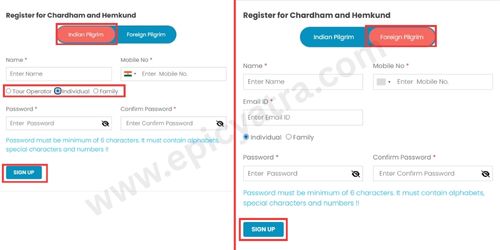
- If you are an Indian pilgrim, choose "Indian Pilgrim"; else choose "Foreign Pilgrim".
For Indian Pilgrim:
Start by entering your full name and a valid mobile number — make sure the number is active because you’ll get an OTP on it for verification.
Then, select your user type:
- Individual (Self): If you’re travelling alone (you can add up to 6 pilgrims in one tour).
- Family (Self and Family): Choose this if you’re registering your family (up to 8 pilgrims allowed).
- Tour Operator: For travel agents (up to 20 pilgrims per tour). You’ll need to provide your company name, GST number, and state.
Once done, set a password, confirm it, and click “Sign Up”.
For Foreign Pilgrims:
If you are a foreign traveller, start by entering your full name and a valid mobile number with your country code.
Next, type in your email ID — make sure it’s correct because you’ll receive your OTP there.
Then, choose your user type:
Individual (Self): If you’re travelling alone (you can add up to 6 pilgrims in one tour).
Family (Self and Family): If you’re travelling with family (up to 8 pilgrims allowed per tour).
Now, create a password, confirm it, and click “Sign Up”.
Step 2 – OTP Verification
-
-
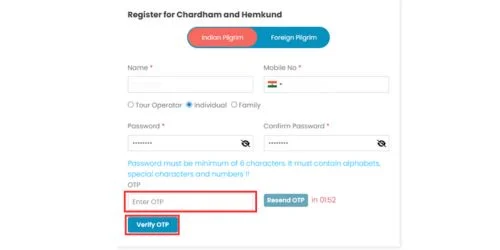
- After you click Sign Up, you’ll get a 4-digit OTP on the mobile number you entered during registration (the one given on the tourism portal).
- Type that OTP in the box and click Verify OTP.
- If the OTP doesn’t arrive or there’s any issue, click Resend OTP, enter the new code, and verify again to move forward.
Step 3 – Sign-In Process
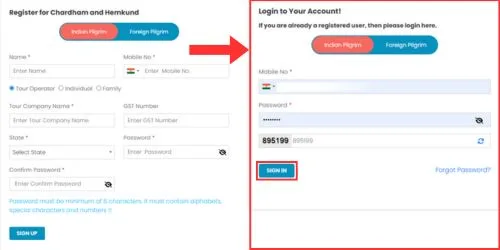
Once your OTP is verified, it’s time to log in to your account. Follow these easy steps:
- Click the “Register/Login” button on the homepage.
- Enter your registered mobile number (the one you used for sign-up).
- Type your password carefully.
- Fill in the correct captcha code to prove you’re not a robot.
- Click on the “Sign In” button to access your dashboard.
Once logged in, you’ll see your personal Char Dham Yatra Registration dashboard—your travel hub for managing registration details!
After you sign in, you’ll reach your dashboard.
Step 4 – Tour Registration Process
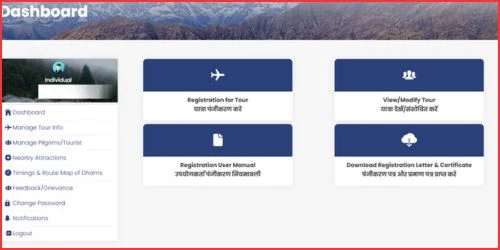
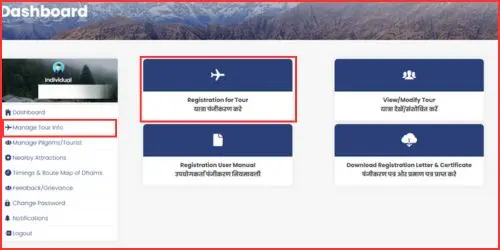
Once you sign in, your dashboard appears—just like when you open your social media app and see your name and profile details on the screen.
Here, you’ll see your user type, name, and mobile number on the left side.
'Dashboard' means:
- 🧳 Registration for Tour: Think of this like booking a new train ticket. Click here when you want to register for a new Yatra tour.
- ✏️ View/Modify Tour: This is like checking or changing your online shopping order. You can view or edit your existing tour details here.
- 🗂️ Manage Tour Info: Imagine managing your travel folder. Here you can update tour information or add a new tour if needed.
- 📘 Registration User Manual: This is your guidebook—just like a “How to Use” manual that helps you understand each step of the registration process.
📄 Download Registration Letter & Certificate / Manage Pilgrims:
Once your tour is confirmed, this is where you can download your registration letter and Yatra Darshan Certificate — similar to downloading your e-ticket or travel pass online.
1. Registration for Tour:
Click on “Registration for Tour” or “Manage Tour Info” on your dashboard.
This is where you begin adding your new Char Dham Yatra details. It’s like starting a new travel form — simple and easy!
2. Now it’s time to fill in your travel information.
- Step 1: Pick your tour dates — when you’ll enter and leave Uttarakhand. You can select them using the calendar (date picker).
- Step 2: Enter how many people are traveling.
👉 For example, if 5 family members are coming, type “5” in the box.
- Step 3: Choose your mode of travel — how you’ll visit the Char Dham sites.
You can select By Road, By Walking, or By Helicopter.
- Step 4: Choose your type of transport.
If you’re traveling by road, select your vehicle type — like a private car or bike.
You’ll also need to fill in your vehicle number and driver’s name.
- Step 5: Select the exact date you plan to visit each Dham.
👉 For example: Yamunotri – 22/04/2026.
- Step 6: Once everything looks correct, click “Save & Create Tour.”
This will create your tour plan successfully
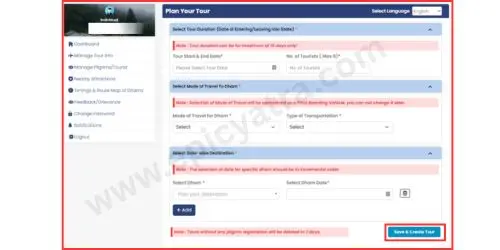
Tip: If you want to edit dates, preview details, or add more pilgrims, simply click “Manage Tour Info.” There, you’ll find Edit and Add Pilgrim options. After making changes, don’t forget to click the “Update” button to save them!
Step 4 – Pligrim Registration Process
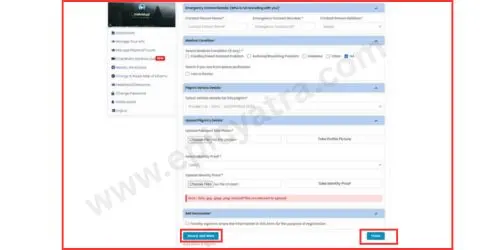
After you save your tour info, you’ll see a second form to fill in your pilgrim details.
This step completes your Char Dham registration.
If you missed this step earlier, don’t worry!
Simply go to the side menu and click “Manage Tour Info.”
There, you’ll find your tour list and can easily click “Add Pilgrim.”
Let’s go step by step:
For Indian Pilgrims (Aadhaar eKYC Required):
- Aadhaar eKYC is mandatory.
- Once verified, your Name, Age, Gender, Address, District, State, Country, and photo from Aadhaar will be filled in automatically.
- You only need to fill in the rest of the fields manually like city, contact info, medical details, and emergency contact.
For Foreign Pilgrims (No Aadhaar Needed):
You’ll need to fill all details manually from Step 1 to Step 14.
Follow These Simple Steps:
- Step 1: Enter your Full Name (it can’t be changed later).
- Step 2: Enter your Age.
- Step 3: Select your Gender.
- Step 4: Add your Email ID, Mobile Number, and Aadhaar Number (for Indians).
✅ Tick the box if your mobile number is also your WhatsApp number.
- Step 5: Choose your Country. (Foreigners can select any country except India.)
- Step 6: Fill in your Address, City, District, and State.
- For foreign pilgrims, only Address and City are required.
- Step 7: Add Emergency Contact Details — name, number, and relation (someone not traveling with you).
- Step 8: Tick the box if you are a doctor or leave it unchecked if not.
- Step 9: Assign your vehicle details (auto-filled from your tour info).
- Step 10: Mention any medical conditions, such as:
- Heart Problem ❤️
- Asthma or Breathing Issue 🌬️
- Diabetes
- Other (you can write it)
- NA (if you have no medical issues).
- Step 11: Upload your passport-size photo.
Step 12: Upload a valid ID proof — Aadhaar, PAN, Passport, or Voter ID.
Step 13: Give your consent to confirm the registration.
Step 14: If you want to add more travelers, click “Save & Add More.” If you’re done, click “Finish.”
If You Want More Pilgrim Simple Click On Add Pilgrim and Continue Same Process.......
Step 5 – Download Yatra Registration
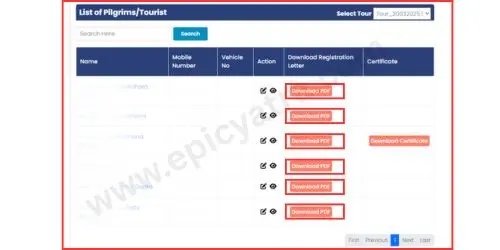
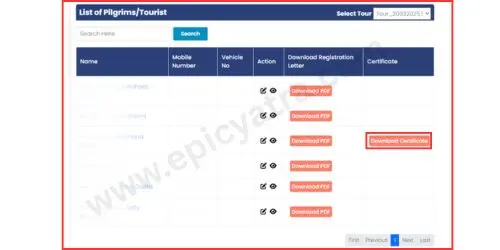
After completing your registration, you can easily download your Yatra Registration Letter in PDF format.
This letter has a unique QR code for each pilgrim — it will be scanned and verified during your Char Dham Yatra.
Here’s how to do it step by step
- Step 1: Go to the side menu and click on “Manage Pilgrim/Tourist.”
- Step 2: From the dropdown list, select your tour.
- Step 3: In the “Download Registration Letter” column, click “Download PDF.”
That’s it! Your Yatra letter is ready — keep it safe and bring it with you during the Yatra.
 Step 6 - Download Your Yatra Darshan Certificate
- After your visit to the Char Dhams, you’ll need to complete the verification process at each Dham.
Once verified by the Yatrimitra Team, you can download your Yatra Darshan Certificate in PDF format.
- This certificate includes your photo, name, unique code, and the name of the Dham you visited — it’s your official proof of completing the Yatra.
Here’s how you can download it easily 👇
- Option 1:
Step 1: Go to the Dashboard or Homepage.
Step 2: Click on “Yatri Certificate.”
Step 3: Enter your Unique Registration Number, Registered Mobile Number, and the Captcha.
Step 4: Click Submit, and your certificate will be ready to download.
OR
- Option 2:
Step 1: Login to the official Char Dham registration website.
Step 2: Click on “Manage Pilgrims/Tourist.”
From here, you can download either your Registration Letter or your Yatra Darshan Certificate.
✅ Epic Yatra reminds all pilgrims to keep this certificate safe, as it’s a proud memory of your spiritual journey and an official proof of your Char Dham completion.
Why Biometric Registration is Mandatory for Char Dham Yatra
Biometric registration is very important for everyone going on the Char Dham Yatra.
It helps the government and Epic Yatra make your trip safe, organized, and worry-free.
Importance of Biometric Verification
Biometric verification means your fingerprint, photo, and ID are recorded once you register.
This helps the officials know who is traveling, where they are, and if they are safe during the Yatra.
Pilgrim Safety and Tracking
If any emergency happens in the mountains, your biometric data helps rescue teams find and help you quickly.
It’s like a safety tag that tells where you are on your journey.
Crowd and Route Management
Every year, thousands of people visit Char Dham.
Biometric registration helps control the crowd and manage routes so everyone can have a peaceful and smooth darshan.
Documents Required for Char Dham Biometric Registration
To complete biometric registration, you’ll need:
- Aadhaar Card (for Indian pilgrims)
- Passport (for foreign pilgrims)
- A passport-size photo
- Your travel details (tour dates and locations)
Can You Complete Biometric Registration Offline?
Yes! You can do biometric registration offline too.
There are many physical registration centers in Uttarakhand — like in Haridwar, Rishikesh, Guptkashi, Sonprayag, Joshimath, and more.
Just visit any nearby center, show your ID proof, give your fingerprints, and your biometric registration will be done in a few minutes.
Emergency Helpline Numbers for Char Dham Yatra 2026
Here are the important helpline numbers you should save before your pilgrimage:
- Tourist Helpline (Uttarakhand): Dial 1364 or from another state +91-135-1364.
- Char Dham Yatra Control Room: 0135-255 9898, 0135-255 2627, 0135-3520 100.
India Customer Care.
- Medical Emergency (Ambulance): 108 (nationwide emergency).
- Fire Services: 101 (for fire-related emergencies).
- Police / General Emergency: 112 (for combined acute emergencies).
Tip: Carry a copy of these numbers (phone or print) and share them with your travel group via Epic Yatra so everyone is prepared.
Budget Char Dham Yatra Packages 2026
Epic Yatra is excited to announce the best Char Dham Yatra Packages for 2026! We offer budget-friendly tour options for every pilgrim, including Char Dham Yatra Packages, Family Packages, and Helicopter Packages.
If you’re looking for a spiritual journey that fits your budget, we’ve got you covered.
Visit our official website www.epicyatra.com
to explore more packages, or call our expert support team at +91 85100 03060 for quick help and bookings.
Looking for the Best Char Dham Yatra Package?
Why Choose Epic Yatra for 2026?
Epic Yatra is a trusted name for Char Dham Yatra tours, certified by the Ministry of Tourism, Government of India, and Uttarakhand Tourism. With 11+ years of experience, we make your yatra safe, comfortable, and memorable.
Expert Travel Assistance
Our friendly team helps you plan every step of your journey — from travel routes to stay options — so you can focus on your spiritual experience.
Flexible Payment Options
We offer easy and secure payment plans that fit your budget.
Pay Securely Now
Make safe online payments with complete confidence.
Get Tour Details
Want more info? Contact our team anytime or visit our website for full package details.
Frequently Asked Questions (FAQ)
1. Is registration mandatory for all pilgrims?
Yes — everyone visiting Badrinath, Kedarnath, Gangotri, Yamunotri or Hemkund Sahib must register. It keeps you safe and helps officials manage the crowd.
2. Can I modify my registration later?
Yes — you can edit dates or details from Manage Tour Info. Make changes and click Update to save them.
3. What if I lose my registration slip?
No problem — you can re-download the PDF Yatra Registration Letter from Manage Pilgrim/Tourist or the Dashboard anytime.
4. Is there any fee for Char Dham registration?
No — registration is completely free. You won’t be charged to register.
5. Can I register my family or a group together?
Yes — choose Family to add up to 8 pilgrims or Tour Operator to add more (limits apply). You can also add pilgrims later via Manage Tour Info.